
配置 3D 地球:RevolverMaps
RevolverMaps 是网站或博客的实时访问者统计小部件的集合。
无需注册,跟 域名\IP 绑定。尺寸和外观可定制。每个小部件都连接到公共实时统计页面,提供有关访问者的更详细信息。
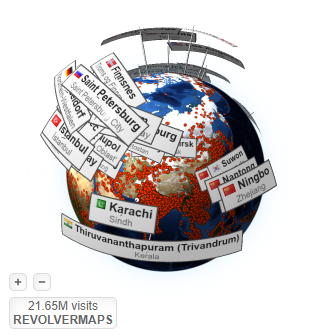
每位访客都会在 3D 地球上留下一个永恒的点,最近的访客位置由显示该国国旗以及城市和州的标签标记。
效果如下:
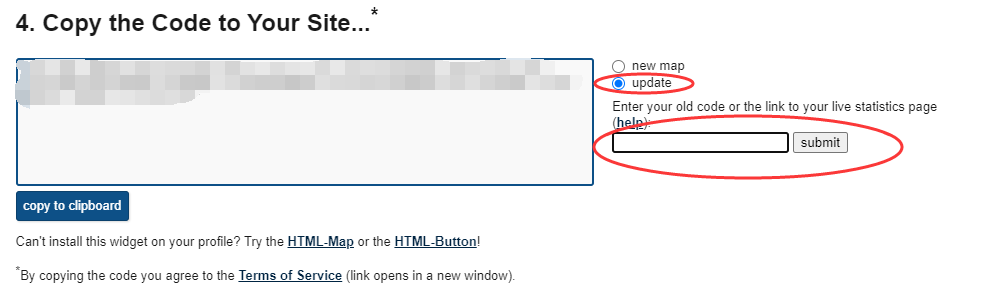
已经使用一段时间后,又想更新地球配置并保留原有访问数据的,必须于 RevolverMaps 自定义配置,提交旧代码或指向原有实时统计页面的链接,编辑提交后再复制相关配置的代码。
注意事项:
必须要配置在 body 内,head 内不会生效。
使用默认配置的,可以 js 动态配置或 html 内引入配置。
不使用默认配置的,则必须配置在 html 文件内,不能使用 js 动态配置。
可以从配置站点的 3D 地球左下角 logo 处,点击查看相关浏览量等统计信息。
普通项目配置:直接复制官网的相关代码,copy 至 html 文件的 body 内就行了。如需自定义 3D 地球位置等,可以参考以下配置。
Vuepress 配置自定义后的 3D 地球
于 .vuepress 内新建文件夹 templates:官方定义的存储 HTML 模板文件。
并于 templates 内根据自己项目需求新建如下文件(不同的模板文件对应不同的环境)。
新建 dev.html:用于开发环境的 HTML 模板文件。
<!-- dev.html -->
<!DOCTYPE html>
<html lang="en">
<head>
<meta charset="utf-8" />
<meta name="viewport" content="width=device-width,initial-scale=1" />
<title></title>
<script type="text/javascript">
window.addEventListener("load", function () {
var isMobile =
!!/Android|webOS|iPhone|iPad|iPod|BlackBerry|IEMobile|Opera Mini/i.test(
navigator.userAgent
);
// PC端显示 3D 地球
if (!isMobile) document.getElementById("maps").style.display = "inline";
});
</script>
</head>
<body>
<div id="app"></div>
<div id="maps" style="pointer-events:auto;display: none;">
<div
style="position: fixed; width: 300px; height: 300px; right: 60px; bottom: 0px;"
>
<script
type="text/javascript"
src="//rf.revolvermaps.com/0/0/6.js?i=5sjxwyomose&m=7&c=e63100&cr1=ffffff&f=arial&l=0&bv=90&lx=-420&ly=420&hi=20&he=7&hc=a8ddff&rs=80"
async="async"
></script>
</div>
</div>
</body>
</html>
新建 ssr.html: 构建时基于 Vue SSR 的 HTML 模板文件。
<!-- ssr.html -->
<!DOCTYPE html>
<html lang="{{ lang }}">
<head>
<meta charset="utf-8" />
<meta name="viewport" content="width=device-width,initial-scale=1" />
<title>{{ title }}</title>
<meta name="generator" content="VuePress {{ version }}" />
{{{ userHeadTags }}} {{{ pageMeta }}} {{{ canonicalLink }}} {{{
renderResourceHints() }}} {{{ renderStyles() }}}
<script type="text/javascript">
window.addEventListener("load", function () {
var isMobile =
!!/Android|webOS|iPhone|iPad|iPod|BlackBerry|IEMobile|Opera Mini/i.test(
navigator.userAgent
);
// PC端显示 3D 地球
if (!isMobile) document.getElementById("maps").style.display = "inline";
});
</script>
</head>
<body>
<!--vue-ssr-outlet-->
{{{ renderScripts() }}}
<div id="maps" style="pointer-events:auto;display: none;">
<div
style="position: fixed; width: 300px; height: 300px; right: 60px; bottom: 0px;"
>
<script
type="text/javascript"
src="//rf.revolvermaps.com/0/0/6.js?i=5sjxwyomose&m=7&c=e63100&cr1=ffffff&f=arial&l=0&bv=90&lx=-420&ly=420&hi=20&he=7&hc=a8ddff&rs=80"
async="async"
></script>
</div>
</div>
</body>
</html>