
nvm 的安装与使用
nvm 介绍
nvm 全名nodejs version manage,是一个nodejs的版本管理工具。
作用
nvm可以控制多个nodejs版本,没有安装nvm之前一个电脑上面只能有一个nodejs版本,开发中,新项目一般使用较新的nodejs版本,老项目使用老版本的nodejs,来回删除安装nodejs就很麻烦,于是有了nvm的诞生,他可以控制多个nodejs版本,对于前端开发人员来说是很方便的一个实用工具。
注意事项
- 安装
nvm之前一定要把电脑上面的nodejs删干净,避免后面安装失败。 - 下载安装包,安装时路径不能有中文和空格,避免后面安装失败。
nvm安装后一定要重启电脑。- 一定要使用管理员身份打开终端或者PowerShell执行命令行操作,不然后面切换
nodejs可能会失败。
下载 nvm
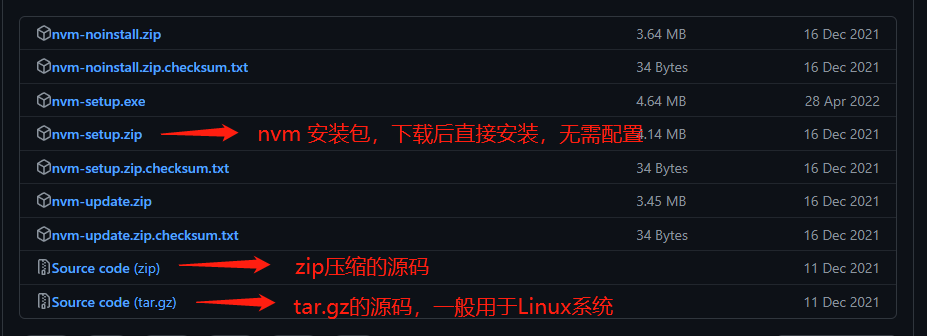
- nvm 安装包说明,推荐下载
nvm-setup.zip安装包,一键安装。
检测 nvm 是否安装成功
在打开的终端输入 nvm -v ,显示如下内容代表安装成功
C:\Users>nvm -v

Running version 1.1.9.

Usage:

  nvm arch                     : Show if node is running in 32 or 64 bit mode.
  nvm current                  : Display active version.
  nvm install <version> [arch] : The version can be a specific version, "latest" for the latest current version, or "lts" for the
                                 most recent LTS version. Optionally specify whether to install the 32 or 64 bit version (defaults
                                 to system arch). Set [arch] to "all" to install 32 AND 64 bit versions.
                                 Add --insecure to the end of this command to bypass SSL validation of the remote download server.
  nvm list [available]         : List the node.js installations. Type "available" at the end to see what can be installed. Aliased as ls.
  nvm on                       : Enable node.js version management.
  nvm off                      : Disable node.js version management.
  nvm proxy [url]              : Set a proxy to use for downloads. Leave [url] blank to see the current proxy.
                                 Set [url] to "none" to remove the proxy.
  nvm node_mirror [url]        : Set the node mirror. Defaults to https://nodejs.org/dist/. Leave [url] blank to use default url.
  nvm npm_mirror [url]         : Set the npm mirror. Defaults to https://github.com/npm/cli/archive/. Leave [url] blank to default url.
  nvm uninstall <version>      : The version must be a specific version.
  nvm use [version] [arch]     : Switch to use the specified version. Optionally use "latest", "lts", or "newest".
                                 "newest" is the latest installed version. Optionally specify 32/64bit architecture.
                                 nvm use <arch> will continue using the selected version, but switch to 32/64 bit mode.
  nvm root [path]              : Set the directory where nvm should store different versions of node.js.
                                 If <path> is not set, the current root will be displayed.
  nvm version                  : Displays the current running version of nvm for Windows. Aliased as v.
nrm 基础操作命令
nvm arch                 显示node是运行在32位还是64位
nvm version              显示nvm版本号
nvm install 版本号       安装该版本号的nodejs,例如 nvm install 16.17.1
nvm uninstall 版本号     卸载该版本的nodejs,例如 nvm uninstall 16.17.1
nvm use 版本号           使用该版本的nodejs,例如 nvm use 16.17.1
nvm list                 查看已安装的nodejs版本
nvm list available       显示可下载的nodejs版本号
nvm on                   开启nodejs版本管理
nvm off                  关闭nodejs版本管理
nvm proxy [url]          设置下载代理,不添加url,显示当前代理,将url设置为none时则移除代理
nvm node_mirror [url]    设置node镜像,默认url是https://nodejs.org/dist/,设置url后可在安装nvm的目录下settings.txt文件查看,也可操作
nvm npm_mirror [url]     设置npm 镜像,默认url是https://github.com/npm/cli/archive,设置url后可在nvm目录下settings.txt文件查看,也可操作
nvm root [path]          设置存储不同版本的nodejs目录,如未设置,默认使用当前目录